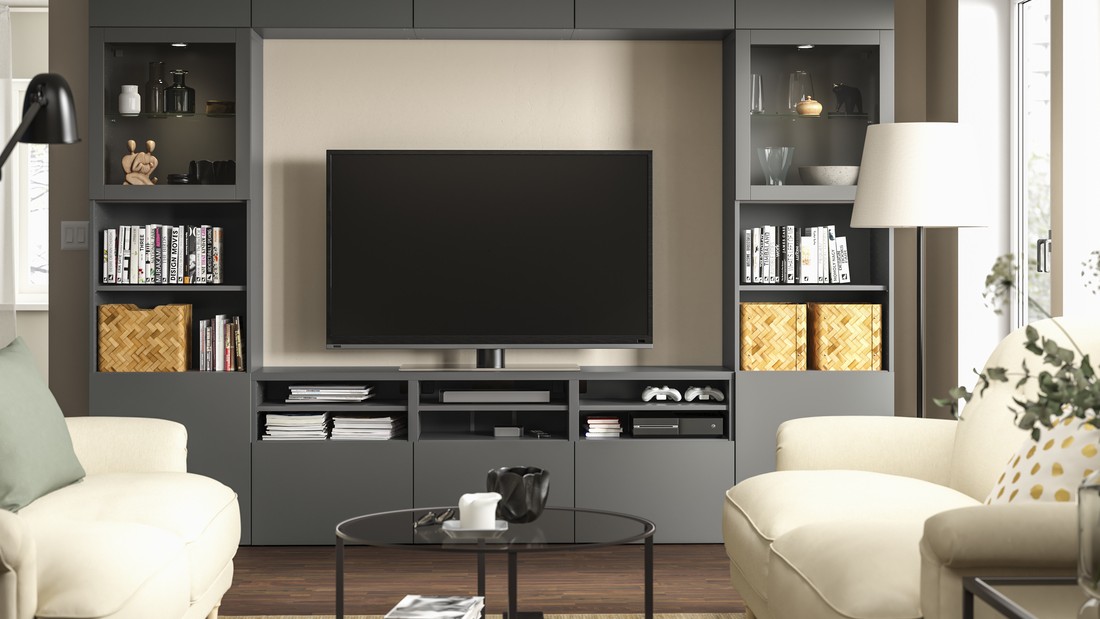
Have you ever felt that your living room's TV area looks crowded, even though you do not have much furniture? An awkward TV position, visible cables, and space-consuming tables can make your entertainment corner feel less organized.
One solution often considered is using a TV bracket to mount the television on the wall. However, before choosing one, it is important to understand which type of support suits your TV size, wall conditions, and viewing habits.
To help you make the right choice, explore the following guide to find a TV bracket that suits your needs.
Mounting a TV on the wall is not the only way to create a tidy living room. You can also consider a more flexible freestanding TV stand that accommodates changes in your room layout.
What is a TV bracket and how does it work?
A TV bracket is a support device used to mount a television on a wall, ceiling, or special structure. This device is generally made of metal and features mounting points designed to support a television within a specified weight limit.
For wall mounting, the bracket connects the back of the television to the wall surface using bolts and special mounting components. Some models keep the screen in a fixed position, while others allow you to adjust the television's tilt.
The main function of a bracket is to help position the screen according to the room's needs. However, installation safety still depends on device compatibility, wall strength, and the correct use of mounting components.
Therefore, before purchasing a TV bracket, you need to know your television's size and weight, the supported mounting type, and the conditions of the installation area.
Functions of a TV bracket for the living room
Using a TV bracket can help organize your entertainment area without always requiring large supporting furniture. This option is particularly relevant for minimalist living rooms, especially when floor space is also used for various activities.
1. Helps save floor space
By mounting your television on the wall, you do not need to provide a tabletop surface to support the TV's feet. The space beneath the television can be used for storage shelves, a low cabinet, or simply left more open.
This approach can help create a lighter appearance in a living room with limited space. However, you still need to consider where to store additional devices such as gaming consoles, controllers, and audio equipment.
2. Helps adjust viewing angles
The television's position affects your comfort while sitting and watching your favorite content. Brackets with certain mechanisms allow the screen to be tilted or directed according to your seating position.
If your sofa is directly in front of the screen, a fixed mount may be sufficient. However, for living rooms with several seating areas, a swivel bracket can provide additional flexibility.
3. Supports a more organized room appearance
A wall-mounted television can create a visual focal point without requiring a large table underneath. As a result, the living room can look simpler, especially when cables and electronic accessories are also organized.
You can pair your television with a low shelf, wall decorations, or furniture in neutral tones. Make sure the decorations do not obstruct the television's ventilation or access to electrical connections.
4. Provides more structured layout options
Mounting a television on the wall helps establish a clearer viewing area. This makes it easier for you to determine the placement of sofas, rugs, coffee tables, and storage furniture.
However, changing the bracket's position after installation is relatively difficult because drilling is usually required. If you enjoy rearranging your furniture, consider this need for flexibility from the beginning.
Read also: 7 comfortable and functional TV room inspirations for different home styles
Types of TV brackets based on their installation methods
Understanding the characteristics of each type of TV bracket helps you choose one based on the screen's position and activities in your living room.
1. Fixed TV bracket for a stationary screen position
A fixed bracket is a mount that keeps the television in one position without an angle-adjustment mechanism. This type is generally used when the viewing area is directly in front of the screen and the room layout rarely changes.
Its design tends to be simple and can position the TV relatively close to the wall. However, you need to consider the space required for connectors and ensure adequate cable access.
2. Tilt TV bracket for adjusting the screen angle
A tilt bracket allows the television to be angled upward or downward within a certain range. This feature can help adjust the screen's direction when the mounting point is slightly higher than eye level.
This option can also help reduce certain light reflections, depending on the position of windows and lamps. Before using it, check the tilt range and the supported TV size and weight limits.
3. Full-motion TV bracket for flexible viewing angles
A full-motion bracket has an arm or hinge that allows the television to be pulled forward, tilted, or rotated sideways. This mechanism is useful when you want to watch from a sofa, armchair, or another area of the room.
Because the screen's position can change, installing this type requires special attention to wall strength. Make sure the fasteners are suitable for the wall material and consider the space required when the arm moves.
4. Freestanding TV mount as a support without wall installation
Unlike the previous three types, a freestanding TV mount uses a supporting structure that rests on the floor. This model can be an alternative for rental homes, apartments, or living rooms where drilling is not possible.
Some freestanding mounts are equipped with wheels, making them easier to move according to different activities. However, not all TV stands use the same mounting system, so their specifications and assembly instructions still need to be checked.
How to choose a TV bracket that suits your needs
Before choosing a model based on its appearance, pay attention to the technical aspects so that the television can be used according to the manufacturer's instructions. There are several things you need to check.
1. Check the VESA dimensions of your television
VESA (Video Electronics Standards Association) is a mounting pattern standard related to the distance between bolt holes on the back of a television. Its dimensions are usually expressed in millimeters, such as 200 × 200 mm or 400 × 400 mm.
The first number indicates the horizontal distance, while the second indicates the vertical distance. You can check this information in the television's manual or official specifications.
2. Match the bracket's weight capacity
Screen size in inches does not directly determine a television's weight. Therefore, make sure the mount's weight capacity matches the device's actual weight, rather than relying only on its diagonal screen size.
Also check the bolt requirements and mounting components recommended by the manufacturer. Avoid using mounts with insufficient weight capacity or without clear installation instructions.
3. Consider the wall material and strength
Concrete walls, brick walls, and gypsum partitions have different characteristics. Not all materials can be used directly for mounting a television without reinforcement or special components.
If you are unsure about the wall's structure, seek assistance from a qualified installer. Determining the drilling points and using suitable fasteners are important steps in reducing the risk of the television becoming detached.
4. Determine the screen position based on your seating area
Try sitting on the sofa in your usual viewing position. Check whether the center of the screen is approximately at eye level so that you do not need to keep tilting your head upward.
Do not consider only the wall's appearance when determining the television's height. The distance from the sofa, screen size, light reflections, and furniture placement also affect comfort.
Wall-mounted TV bracket or freestanding TV stand: Which one suits your needs?
Both options serve different purposes and do not have to be viewed as competing alternatives. A wall bracket offers a relatively permanent television position, while a freestanding TV stand can provide greater flexibility when the room layout changes.
|
Consideration |
Wall-mounted TV bracket |
Freestanding TV stand with wheels |
|
Installation |
Generally requires drilling |
Does not require wall drilling |
|
Mobility |
Relatively permanent |
Can be moved if designed for it |
|
Floor space |
Does not use floor-standing support legs |
Requires space for the frame and wheels |
|
Storage |
Depends on additional furniture |
Depends on the stand's design |
|
Suitability |
Rooms with fixed layouts |
Multifunctional rooms or frequently changing layouts |
If the television is always used from one sofa position, wall mounting can be a practical choice. On the other hand, if the living room also serves as a play area or gathering space, a movable stand may be more suitable.
Also consider storage needs and access to electricity. Changing the TV's position will be easier if cable routes, power outlet locations, and furniture movement space have been planned.
An alternative to TV brackets: YXSTABY TV stand
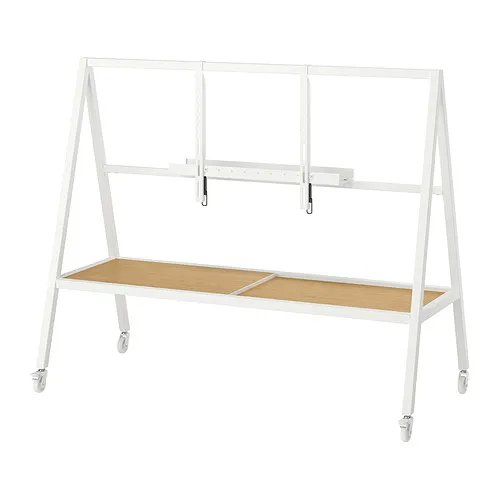
YXSTABY is available in black and white. This product is a freestanding TV stand with wheels, not a wall-mounted bracket.
If you need a television support that is not permanently attached to the wall, the YXSTABY TV stand from IKEA can be an option worth considering.
YXSTABY features a freestanding structure with lockable wheels, allowing the stand's position to be adjusted according to your needs. Its design also includes storage shelves, hooks, and a tray to help organize entertainment devices.
Explore the features of the YXSTABY TV stand
-
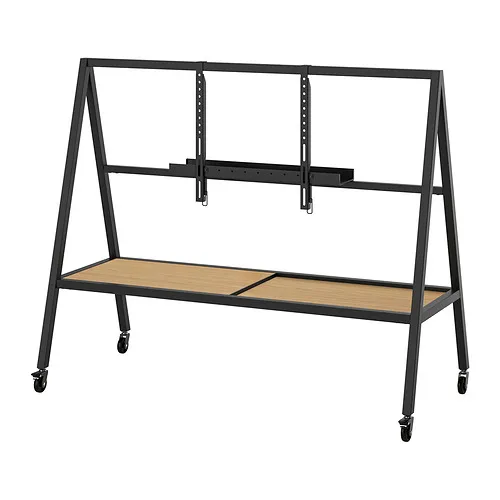
Lockable wheels: Allow you to change the position of the TV stand within the room and then lock the wheels when the stand is in use.
-
Device storage shelves: Provide space for consoles, gaming controllers, and other accessories to keep them from being scattered around the television.
-
Simple and functional design: The open-frame structure and black-and-white color options make it easier to combine the stand with various living room interior styles.
YXSTABY TV stand specifications
|
Specification |
Details |
|
Product name |
YXSTABY TV stand |
|
Supported TV size |
Up to 55 inches |
|
Stand width |
137 cm |
|
Height |
113 cm |
|
Stand depth |
44 cm |
|
Maximum load per shelf |
15 kg |
|
Features |
Lockable wheels, storage shelves, hooks, and tray |
|
Color options |
Black and white |
|
Design collaboration |
IKEA and XBOX |
The maximum load of 15 kg refers to the storage shelf, not the television's weight limit. Check the assembly instructions to determine mount compatibility and TV installation requirements.
When is YXSTABY suitable for use?
YXSTABY can be considered when you have a living room used for various activities. For example, the television may be positioned on one side of the room when watching movies, but you may want to change its position when playing video games.
The wheels can also be helpful when you want to rearrange furniture without removing a mount from the wall. Before moving it, make sure the path is clear, the cables have been disconnected or are sufficiently long, and the floor is suitable for wheeled furniture.
For smaller living rooms, pay attention to the dimensions of the YXSTABY frame before purchasing. Measure the available area and leave enough movement space so the stand does not block doors, walkways, or other furniture.
You can explore the white YXSTABY TV stand or black YXSTABY TV stand at IKEA Indonesia.
Read also: Minimalist TV cabinet styling ideas with 4 interior themes
Tips for arranging your living room with a TV stand
After determining the type of television support, the next step is to organize the surrounding area. A thoughtfully planned furniture arrangement can make your living room easier to use for various activities.
1. Adjust the distance between the television and sofa
Consider the screen size, television resolution, and viewing distance recommendations from the device manufacturer. Try several seating positions to ensure the picture is comfortable to watch without excessively changing your posture.
If you use a TV stand with wheels, mark the area where it is usually placed. This can help maintain a consistent viewing distance even when the furniture is occasionally moved.
2. Organize electronic device cables
Power cables, HDMI cables, and audio equipment can make the television area look cluttered when left hanging. Use suitable cable ties or cable channels to group connections and reduce the risk of tripping.
For movable TV stands, avoid securing cables too tightly or making them too short. Leave enough room to access connections without pulling on connectors or interfering with the stand's movement.
3. Combine it with proportionate furniture
A television area does not always require a lot of furniture. Sofas, coffee tables, and additional storage can be selected based on the activities most frequently carried out in the living room.
If you use an open-design TV stand, consider adding storage boxes or other furniture for small items. Choose complementary colors to maintain a visually comfortable room.
Mistakes to avoid when choosing a TV stand
Common mistakes include the following:
-
Choosing a television support based only on screen size. In fact, the mounting pattern, television weight, device dimensions, and support capacity need to be checked together.
-
Ignoring wall construction or mounting the screen too high. Improper installation can affect safety and comfort when watching television for extended periods.
Also consider your daily usage needs before choosing a type of stand. If you frequently rearrange furniture, think about whether permanent installation truly suits your habits.
Do not overlook space for cables and electronic device ventilation. An arrangement that looks tidy should still allow devices to be used according to the manufacturer's instructions and remain easily accessible when needed.
Create a more flexible TV area with IKEA
Understanding the functions and types of TV brackets helps you choose a television support based on your living room's needs. Wall mounting can be an option for fixed layouts, while freestanding TV stands offer a different approach when flexibility is a priority.
For those of you who want an entertainment area that is easy to adjust, the YXSTABY TV stand from IKEA offers a wheeled design with storage for various accessories. Its shape can also become part of a modern living room arrangement without having to mount the television directly on the wall.
Explore the YXSTABY TV stand at IKEA Indonesia and discover living room inspiration that suits your activities. Check the specifications, color options, and product availability at IKEA.co.id to start planning a more organized entertainment corner.
FAQ about TV brackets
Not all televisions are compatible with every type of bracket. You need to check the VESA pattern, device weight, bolt requirements, and mount specifications before purchasing.
Wall-mounted brackets generally require drilling and special fasteners. If you want to avoid drilling, a compatible freestanding TV mount or wheeled TV stand can be an alternative.
In general, the center of the screen should be positioned approximately at eye level when you are seated in your viewing position. Adjust it according to the sofa height, television size, and room conditions.
Check the VESA pattern and TV weight in the manual or on the manufacturer's official website.
A TV bracket is a component that supports or connects a television to a specific structure, such as a wall or supporting frame. Meanwhile, a TV stand is a piece of furniture that can function as a television support while also providing storage for electronic accessories. The YXSTABY TV stand uses a freestanding structure with wheels, making it different from a wall-mounted TV bracket.